Development hosts
Shared deployment for development and runner hosts
Categories:
infra/dev owns the existing workstation at dev1.dev.alwaldend.com
(192.168.1.210) and the secure runner at secure1.dev.alwaldend.com
(192.168.10.102).
One Ansible deployment configures both host groups while
preserving their current roles, users, package backends and storage settings.
The secure runner uses the shared host and Forgejo runner roles, with one
self-hosted host-executor slot scoped to alwaldend/src. Jobs run as the
unprivileged forgejo-runner account and share its persistent filesystem;
only trusted code belongs on this worker. Ansible installs Node.js, Bazelisk,
AL and the repository Android prerequisites. Its
provisioning root owns the XO VM through the
shared development identity and its own resource set.
The NAS AppRole project owns its namespace and cache in independent state using the NAS operator identity; VM provisioning only attaches the 800-GiB disk from the dedicated XO repository. The module owns encrypted storage and private ACLs. Terraform publishes disk metadata to Vault for automatic Ansible injection and UUID mounting. The worker requires the mount; action-cache GC is 700 GiB and Bazel working state remains local. The rollout record records the live mount, worker and repeated-action cache verification.
The runner reuses the API-issued identity owned by
infra/forgejo, delivered through
an exact-path Vault read grant for the development deployment. Jobs receive no
deployment credentials. The repository’s
CI workflow runs only on pushes to master:
it checks out the event revision and invokes the local action backed by
tools/ci. The command builds and tests all normal
targets in the root and declared nested Bazel workspaces.
Secure1 jobs use the existing Vault-owned T3 Code HTTP proxy for external
downloads. Ansible injects the selected password into the restricted runner
configuration, without logging it. A loopback socket on port 18080 forwards
HTTP proxy traffic over certificate-verified TLS to
yc1.nodes.threexui.alwaldend.com:40201, supporting Bazel’s Java downloader.
Both cases of NO_PROXY bypass localhost, alwaldend.com and its subdomains;
private CIDR entries also apply to clients that support them. The proxy is
scoped to jobs; the runner daemon continues contacting the local forge directly.
Ansible installs zip for Android test archive creation. The
2026-11-17 rollout
records the authorized deployment, a no-change rerun, successful upstream
requests and checksum-verified Bazel download, and direct local-forge access.
Dev1 runs Traefik in front of T3 Code and ComfyUI, with mTLS enforced by public ingress. The host firewall blocks direct external access to the application ports and accepts new connections only on SSH, HTTP, and HTTPS ports.
ComfyUI uses comfyui.dev1.dev.alwaldend.com. Site-local
DNS points to dev1; public DNS points to ingress, which forwards HTTPS
through dc1.comfyui.dev1.dev.alwaldend.com with the
service hostname as TLS SNI. Local Traefik uses the Vault certificate resolver
and forwards to 127.0.0.1:8188. Ansible declares the route; the server must
be started separately using the ComfyUI launcher.
The canonical package updater keeps automatic OSTree staging enabled without
automatic reboot. The automatic_updates tag reconciles this policy. The
shared infra/security playbook performs on-demand audits and stages immediate
system updates; activating a staged deployment requires a separately authorized
reboot.
Ansible declares Tuned’s balanced power profile through
dev1_tuned_profile, enables the existing Tuned service, and reconciles
the selected profile in manual mode. The power_profile tag scopes those
tasks. The live setting was applied directly at the user’s explicit request;
no Ansible deployment was run for that initial change.
Ansible and DNS use the dedicated src_infra_dev AppRole. SSH signing is scoped to these hosts and TLS issuance to dev1’s services.
OpenHands has been removed and disabled; deployment neither installs it nor reads
its Vault key. The completed one-time removal tasks are no longer in the playbook.
DNS credential reads cover dc1 and public records.
Provision this identity through Vault Terraform before deploying.
One DNS root consumes the complete dnsconfig.json and uses
the src_infra_dev/tf_backend/dns backend. The authorized handoff adopted all
12 existing records without recreation; the rollout record
records the state boundaries and rollout results.
DNS, Vault and host deployment remain separately authorized operations.
T3 Code controls permissions per thread. Its Auto mode maps to Codex
Auto-review. The managed Codex requirements allow read-only and host-bot
permissions with on-request approvals, so threads cannot select Full
access or disable approvals. The requirements file only allowlists the
host-bot profile; it must not define the profile because T3 Code supplies a
per-thread config layer with the same name, and Codex rejects profiles defined
by both requirements and config. The normal and isolated provider configs
define host-bot with workspace writes, public command-network access, and
write access to the Bazel cache and Bazelisk directories while keeping local
network binding and loopback connections available for Bazel servers. Other
private network targets remain blocked. T3 Code must select that profile for
the thread. Hosted web search is not restricted by this role.
The deployment installs pinned Bazelisk as ~/.local/bin/bazel and AL as
~/.local/bin/al. Run builds and tests with ordinary bazel commands.
The managed user bazelrc supplies bounded,
non-interactive output and failure-focused test reporting directly, so these
defaults also apply in workspaces without a named agent profile. Explicit
command-line options can override them. AL supplies repository lifecycle
commands and the workspace status used by release builds.
Two SATA SSDs, selected by their stable ATA IDs, back the sata_ssd volume
group. Its striped bazel_cache logical volume is mounted persistently at
/var/cache/bazel. Every Bazel workspace uses its disk_cache directory and
the managed user bazelrc points its output-user root at the same filesystem.
The managed user bazelrc also sets repo_contents_cache
to /var/cache/bazel/repo_contents_cache. This requires the live bazelrc to
match that file and the cache directory to exist with its Ansible-defined
ownership and permissions. Eligible materialized external repositories are
then shared across output bases: the first cache miss extracts an archive,
and later worktrees reuse the cached contents instead of repeating extraction. The repository cache still
avoids the network archive download. Automatic garbage collection caps the
action disk cache at 700 GiB, leaving room within the 1-TiB filesystem for
output bases, repository contents, and install state; the volume group retains
about 900 GiB for later growth or another logical volume. Because the volume is
striped, either SSD failing invalidates the disposable cache.
The managed bazelrc sets GO_REPOSITORY_EPHEMERAL_MODCACHE=1. Gazelle 0.53.0
uses a temporary Go module cache for each module fetch and deletes it after
materializing the repository. Pinned, reproducible Go repositories can then
be reused through the shared Bazel repository-contents cache across worktrees.
The variable saves duplicate download-cache space; it does not enable Bazel
cache reuse. A repository-contents cache miss downloads the module again,
including after changes to Gazelle or generation inputs. Gazelle’s default
instead retains module ZIPs within each output base while pruning extracted
module trees. Explicit host module-cache settings take precedence over
ephemeral mode.
The managed user bazelrc limits each Bazel invocation to four concurrent jobs and budgets one quarter of the host CPUs for local actions. These scheduling limits apply to builds and tests; they do not impose a combined CPU cap across independent Bazel processes or Codex sessions.
Executable repository tools use /var/cache/bazel/tool_cache. Unlike the
disposable action and output caches, this directory is private to the host-bot
account. Cache entries are keyed by declared source, build configuration,
platform, and dependency pins, and are installed atomically after a Bazel
build on the first miss.
The arXiv MCP server is pinned to version 0.7.2 and runs locally over stdio.
Its downloaded papers and search data live under
/srv/misc/arxiv-mcp-server/papers on a reusable 100-GiB misc logical
volume in the existing sata_ssd volume group. The volume is mounted for
reconstructible non-executable application data. Data with durability or
different reliability requirements belongs on a separate volume.
The managed Codex configuration allows up to 20 concurrent subagents per session. The root agent is accounted for separately.
Ansible installs Codex and Grok CLI as the managed user through the official
https://chatgpt.com/codex/install.sh and https://x.ai/cli/install.sh
installers. Both commands are placed in ~/.local/bin. The codex_install
and grok_install tags select only their respective installation tasks;
codex and grok also include them. An existing command skips its installer,
so deployment provisions missing CLIs without upgrading installed versions.
First installation follows the upstream installer’s current release, and
Grok’s installer also provisions its shell integration and completions.
Node.js and npm are provisioned through the development VM role’s mutable or
OSTree package backend. OpenSpec 1.14.2 (@fission-ai/openspec) is installed
without npm lifecycle scripts under the managed user’s ~/.local prefix,
providing ~/.local/bin/openspec. Its exact version is controlled by
openspec_version; the openspec tag selects its prerequisites and installation.
Repository workflows continue to use the repository-pinned Bazel CLI wrapper.
Ansible installs the repository-pinned standalone Forgejo CLI as
~/.local/bin/fj. The fj tag selects only its user-local directory and binary
tasks; reapplication preserves an unchanged executable. On dev1,
bazel run //infra/dev/ansible:fj_install runs those same tasks locally without
SSH or Vault authentication. This target changes only the managed user’s CLI
installation. Native fj authentication is a separate user-authorized operation;
Ansible does not install passwords or API tokens. See the
Forgejo CLI guide.
The workstation’s managed Git configuration uses that native login for
https://forgejo.alwaldend.com/alwaldend/src.git. Its credential helper asks
fj to refresh the login when necessary and reads the matching host entry from
the private credential file used by fj 0.7.0. The git tag selects the Git
configuration and helper installation. Git obtains its credential from the
helper on request.
Open Computer Use 0.3.3 is then installed without npm
lifecycle scripts under the managed user’s ~/.local prefix. Its skill is
then installed for the whole host under /etc/codex/skills from the matching
immutable upstream revision. The deployment configures its stdio MCP server in
the normal Codex config and the isolated OpenRouter and Abliteration homes.
The MCP can inspect and control the logged-in desktop session, so agents must treat its actions as real user input and obtain approval before
externally visible or destructive actions.
The API Codex home is ~/.codex-api. It uses the shared managed Codex
settings and instructions, requires API-key login, and keeps its credentials
and conversation state separate. The codex_api tag selects its configuration.
With OPENAI_API_KEY set in your terminal, log in with:
printenv OPENAI_API_KEY | CODEX_HOME="$HOME/.codex-api" codex login --with-api-key
Start it with CODEX_HOME="$HOME/.codex-api" codex. In T3 Code, set
CODEX_HOME path to /var/home/simeonwarrenbot/.codex-api and start a new thread.
Ansible does not provision or copy API credentials.
OpenRouter is available through its isolated Codex home. Its
configuration reads its API key from the desktop keyring entry selected by
service=openrouter and application=codex; the key is not stored in the
configuration. Repository work uses the repo-owned $codex-migration skill, while
the user-level Codex instructions require isolated migration testing and
intentional host changes to be mirrored into this role. Existing sessions are
not redirected because provider-bound encrypted reasoning history cannot
safely migrate in place.
T3 Code can use OpenRouter as a separate Codex provider by setting its
CODEX_HOME path to /var/home/simeonwarrenbot/.codex-openrouter. That
isolated home defaults to ~deepseek/deepseek-v4-flash-latest and shares no
conversation state with the ChatGPT-backed Codex provider. Start a new thread
when selecting it.
The OpenRouter no-tools home at ~/.codex-openrouter-no-tools mirrors the
OpenRouter provider with every tool surface disabled. It reuses the same
keyring lookup and model, sets web_search = "disabled", turns off the shell,
unified-exec, image, multi-agent, computer-use, browser, app, plugin, and goal
features, and disables the request_user_input tool and the MCP servers.
Codex then advertises no tools at all, so the model can only reply with text.
This matters beyond tidiness: OpenRouter rejects a request that carries any
tools when its routed endpoint supports none, so a single leftover tool fails
the turn.
T3 Code launches the Codex app server with
-c mcp_servers.t3-code.url=..., so its own MCP server would otherwise
reintroduce the MCP resource tools. The no-tools config therefore declares
[mcp_servers.t3-code] with enabled = false, which still wins over that
launch-time override.
Select it in T3 Code with CODEX_HOME path set to
/var/home/simeonwarrenbot/.codex-openrouter-no-tools and start a new thread.
The Abliteration and standard OpenRouter homes keep their tools.
Abliteration uses a separate home with
CODEX_HOME="$HOME/.codex-abliteration" codex, using the endpoint and model from its
Codex integration guide.
It retrieves its API token at runtime with secret-tool, selecting
service=abliteration and application=codex. Save the token from an
interactive terminal in the same user’s desktop keyring:
secret-tool store --label='Abliteration API token for Codex' service abliteration application codex
Enter the token at the hidden prompt. The configuration contains only the
lookup command. Provider response and tool-call validation require a saved
token. Both providers keep their configuration and conversation state outside
the main Codex home; provider profiles in the main home are removed. For
T3 Code, set its CODEX_HOME path to
/var/home/simeonwarrenbot/.codex-abliteration and start a new thread.
T3_MCP_BEARER_TOKEN authenticates the Codex app-server’s loopback MCP
connection to T3 Code at /mcp. Codex excludes it from model-spawned commands
so those subprocesses do not inherit the credential.
Codex terminal session argument limitation
Codex can reject write_stdin before it reaches a running command when a
provider encodes session_id as a whole floating-point number. For example,
{"session_id":96230.0} fails with invalid type: floating point, expected i32,
while {"session_id":96230} parses successfully. Use the actual ID returned by
exec_command; the number above is only an example. Quoting the ID changes it
to a string and is also rejected by the integer parser.
As checked on 2026-11-15, upstream tracks this schema/parser mismatch in
Codex issue #33452.
The installed CLI reported 0.167.0: its
tool schema
advertises session_id as number, but its
terminal resolver
uses strict i32 deserialization. The
0.169.0 resolver
and argument parser
retain that behavior, so upgrading to that release alone does not fix it.
This evidence establishes an argument-parsing defect; it does not establish
that an XML parser caused the numeric conversion.
Retry the terminal-continuation call with the original session ID encoded as a
bare integer, without a decimal point or quotes. If the client keeps converting
it to a float or the session is unavailable, inspect the original process and
resource state before repeating its shell command. An argument error does not
cancel a process already started by exec_command or establish whether its
operation succeeded. For Terraform, confirm that the original operation has
exited before any authorized stale-lock recovery, then use the owning
component’s Terraform workflow. This note records the upstream limitation;
the host does not carry a local parser patch.
Cache cleaning
bazel clean removes the current workspace’s build outputs and
resets its local action cache. Adding --expunge removes that workspace’s
entire output base and stops its Bazel server. Neither operation purges the
shared action disk cache, repository-contents cache, or archive-download cache,
so another worktree can continue reusing them.
With the pinned Bazel 8.7.0, repository-contents garbage collection removes
entries unused for 14 days after the server has been idle for five minutes,
using the defaults of --repo_contents_cache_gc_max_age and
--repo_contents_cache_gc_idle_delay. Routine manual cleanup of that cache
is unnecessary. The action disk cache uses the managed 700-GiB cap described
above. The archive-download cache at
/var/cache/bazel/output_user_root/cache/repos/v1 has no automatic cleanup
configured and requires separate maintenance to reclaim its space. Gazelle’s
ephemeral module download cache is already deleted after each fetch.
Architecture
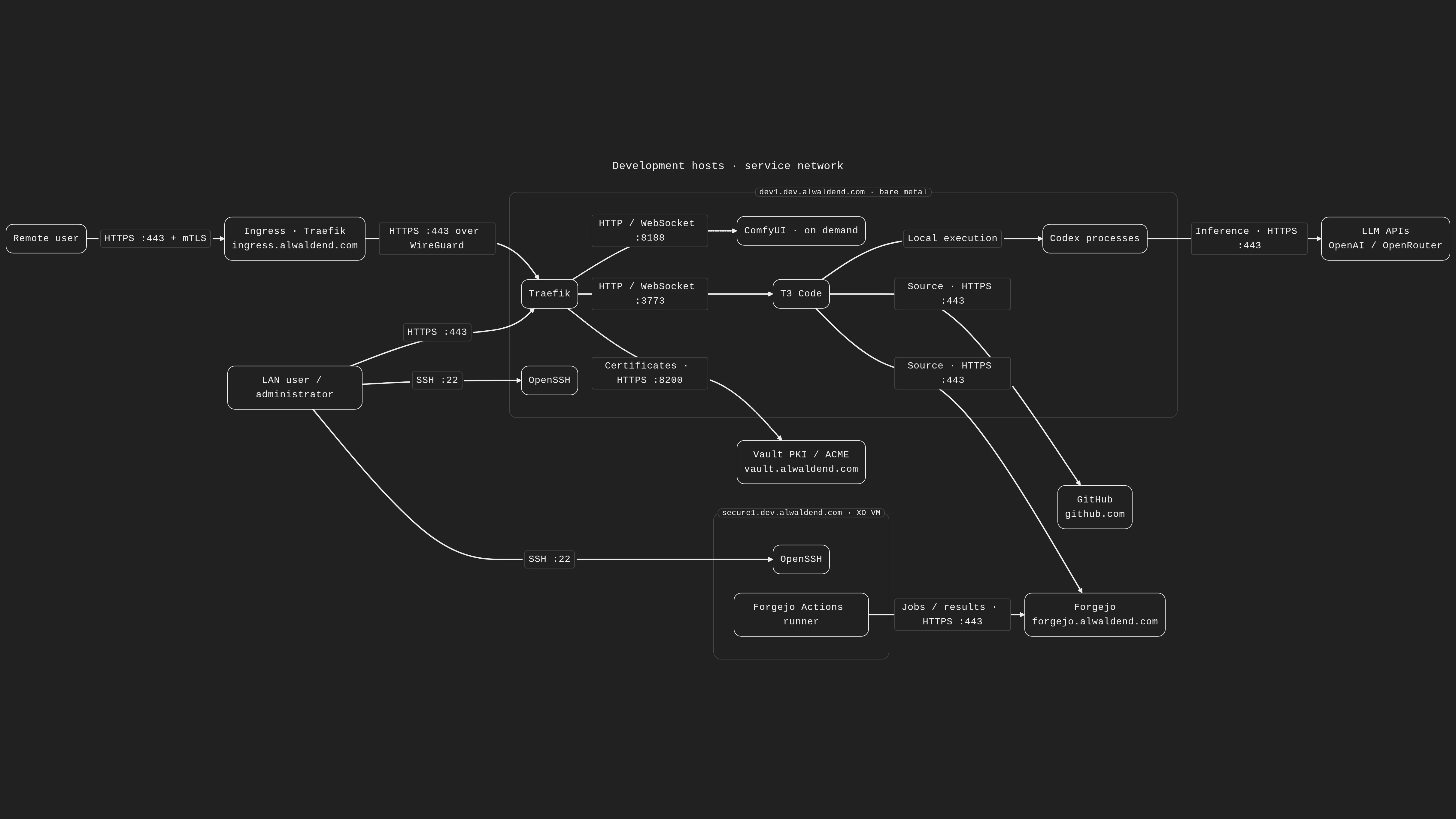
Development hosts

The Forgejo runner and development machine share deployment configuration under
infra/dev while retaining separate roles. This service overview shows the
runner enabled.
Download the dark WebP diagram.
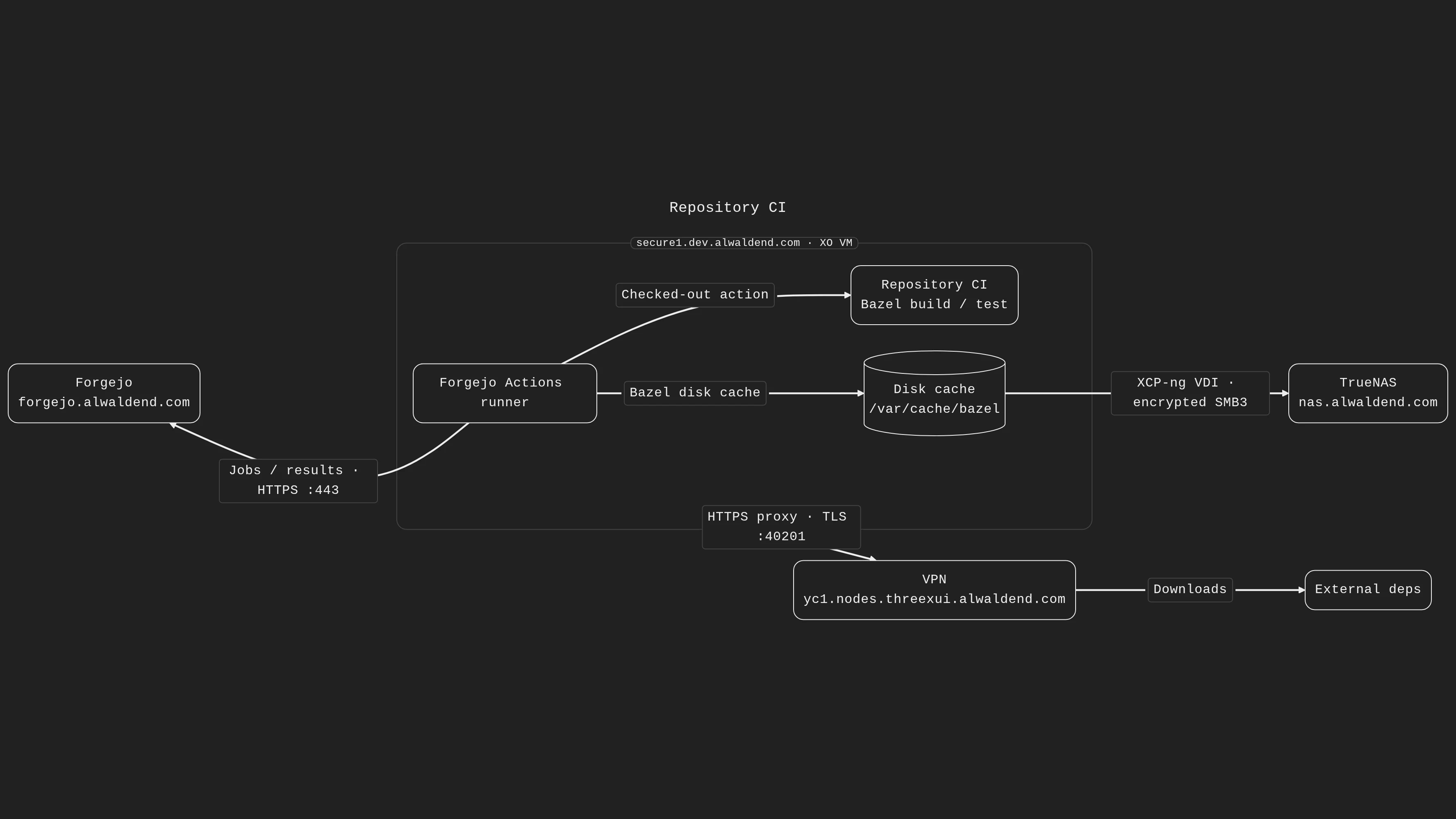
Repository CI

The runner uses a guest cache disk backed by the NAS through XCP-ng. The
diagram source uses the same light/dark site render as the
development-host diagram. //infra/dev:rendered_ci_svg builds both SVG variants.
Download the dark WebP diagram.
T3 Code

The diagram source is t3code-architecture.mmd,
and the SVG beside this page is rendered from it at build time by
//infra/dev:rendered_svg. Edit the .mmd to update the generated image.
Rendering uses the repository’s pinned Mermaid, headless Chrome, and Liberation
font inputs. The site preset renders native light/dark SVG variants with bordered
caption labels and rounded containers; it does not post-process the generated SVG.
The site selects the variant matching its theme menu. The rendered_historical
target retains the original appearance used by the historical blog publication.
ComfyUI

The HTTP API and CPU generation thread share one ComfyUI process. The public Z-Image target starts that process inside a transient systemd scope; model weights and generated PNGs remain on Host Bot.
The source is docs/comfyui-architecture.mmd.
//infra/dev:rendered_comfyui_svg builds the light and dark
documentation assets in the same site style as T3 Code.
Deployment
Follow the playbook guide. The wrapper automatically loads the provisioned cache metadata from Vault when deploying secure1.