This X Article was generated from Markdown
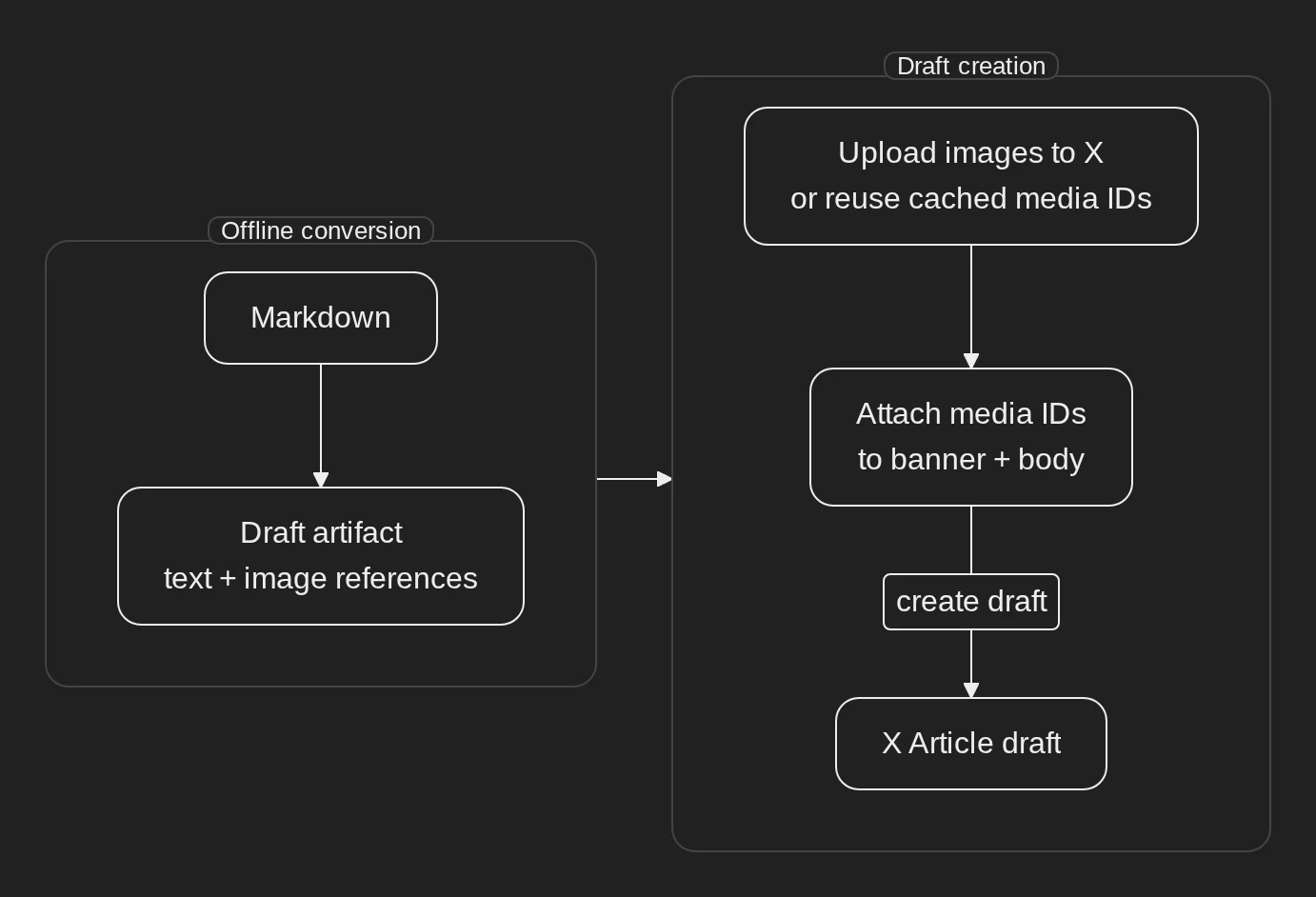
I’ve had the displeasure of using X’s Article editor and it has left me unsatisfied - it’s utter dogshit. Naturally, I’ve decided to avoid it altogether. There probably exists a ready-made solution, but I’ve decided to just write it myself. After all, how hard can it be?
Not that hard, to be honest. X exposes an API to upload articles in DraftJS format, so that leaves two tasks:
- Construct DraftJS
- Upload it
Construct DraftJS
Since I use Hugo to build my blog posts, I wanted to just render DraftJS using it - that did not work. Hugo does not expose the Markdown AST to templates and without it you are left with hooks, which are too limited, and raw-dogging RawContent in templates which is insane. After that, I moved on to the boring option of just parsing Markdown. I chose Goldmark since it’s the parser Hugo uses, then wrote a tool that walks through the Markdown AST and emits DraftJS.
Upload it
The upload seemed like the most straightforward part to me before I started. Just generate a token, put it in Vault, and hit the API, easy. None of it was easy. Figuring out which token I need to generate to upload articles and how to do it through the dashboard took some effort. Putting a token in Vault was harder than I expected because either I had to use OAuth 2.0 with a short-lived token and a long-lived refresh token, or I had to use OAuth 1.0a with 4 whole secret values. I chose the second option because the first one requires me to update credentials on refresh which increases complexity. Uploading was painful because X has a rate limit of 10 (!) uploads per day which I hit immediately.
In conclusion
I don’t have to touch the editor anymore, which is a win in my book. The blog post ends here. Everything else is just a conversion showcase.
Text and inline styles
A paragraph is a plain text block. X exposes three heading styles, so the converter maps fourth-level and deeper Markdown headings onto header-three. Inline styling is carried as ranges over the block text: bold, italic, and strikethrough all survive the conversion, and a span may combine them, as in bold with nested italic inside.
Heading levels
A third-level heading becomes header-two; a fourth-level heading and deeper become header-three.
A clamped fourth-level heading
Lists
Unordered lists and ordered lists map onto their own block types:
- Draft creation resolves each referenced image.
- It uploads the bytes through the media endpoint.
- It attaches the returned
media_idto the entity its locator names.
- Convert the post offline.
- Create the draft with the injected credential.
- Review the draft before it becomes public.
A nested item is emitted as its own list item, because the endpoint’s schema has no block depth:
- Parent item.
- Nested item.
- Another parent item.
Quotes
X exposes a blockquote type, so quoted prose keeps its quote. A heading inside a quote stays quoted text and reports the lost heading level, because there is no quoted-heading form.
Code
A fenced code block is preserved as a markdown entity, so the source travels intact:
func (c Credentials) Sign(method, rawURL string, params url.Values, now time.Time) (string, error) {
    // HMAC-SHA1 over the normalized parameter string, per RFC 5849.
}
An inline-code span keeps its text but loses its monospace styling, and the conversion reports that loss.
Tables
A GFM table has no native block, so it becomes a markdown entity that preserves the source:
| Element | Entity type | Mutability |
|---|---|---|
| Link | link |
mutable |
| Image | image |
immutable |
| Divider | divider |
immutable |
| Code and tables | markdown |
immutable |
Links and autolinks
A link carries its destination in a link entity: the repository skill for Mermaid diagrams. An autolink such as https://example.com becomes a link to the same destination.
Divider
Footnotes
A footnote reference1 becomes a trailing section, so its text is not lost.
Note on images and captions. An image becomes an
atomicblock backed by animageentity carrying its alt text as a caption, and the media is resolved at draft time.
Emphasis edge cases
An underscore inside a word like snake_case stays literal, a backslash escape such as *not italic* stays literal, and the HTML character reference & in AT&T is resolved to an ampersand.
-
DraftJS measures inline and entity ranges in UTF-16 code units of the block’s final text, which is why the converter counts them that way. ↩︎