This project owns the three-dimensional Mermaid renderer, scene layout, interaction, packaging, and browser verification. Existing diagram definitions and their themes stay with their consumers; Mermaid dependency pins remain in the repository’s tools pnpm workspace.
Build all five graph examples and open any generated HTML file in a WebGL 2 browser:
bazel build //projects/mermaid_3d/samples:html
Outputs are in bazel-bin/projects/mermaid_3d/samples/. Each .3d.html embeds
Three.js, camera controls, the scene, and Liberation Mono. Viewing requires no
server or network requests. Drag to orbit, right-drag to pan, and scroll to zoom.
The controls select light or dark appearance, reset the camera, show a front
view, and inspect nodes, groups, and connections. Labels face the camera.
Selecting a connection highlights it and its endpoints; node selection includes
direct connections, and group selection includes nested members.
Elements remain independently selectable when different kinds share an ID.
The default readable view keeps text at least 12 CSS pixels at reset scale;
large scenes scroll within their panel. Fit diagram shows the complete
overview, and Reset view restores readable framing. On touch screens, swipe
to scroll the readable view; switch to the overview for orbit and pinch controls.
The overview panel follows the scene’s proportions up to its desktop or phone
height limit, keeping inspection controls near wide diagrams.
Camera clipping follows the scene’s depth as the view changes, including large
flowcharts whose initial camera distance exceeds that of the examples. Drawing
buffers fit the device’s WebGL limits, reducing pixel density for wide scenes
while preserving their CSS dimensions and scrolling.
The theme gallery owns the six
Mermaid definitions. The sample targets consume the five graph definitions directly and use
the shared //internal/assets:mermaid_theme bundle and its pinned diagram font.
The gallery links static SVGs and interactive 3D views.
Rendering
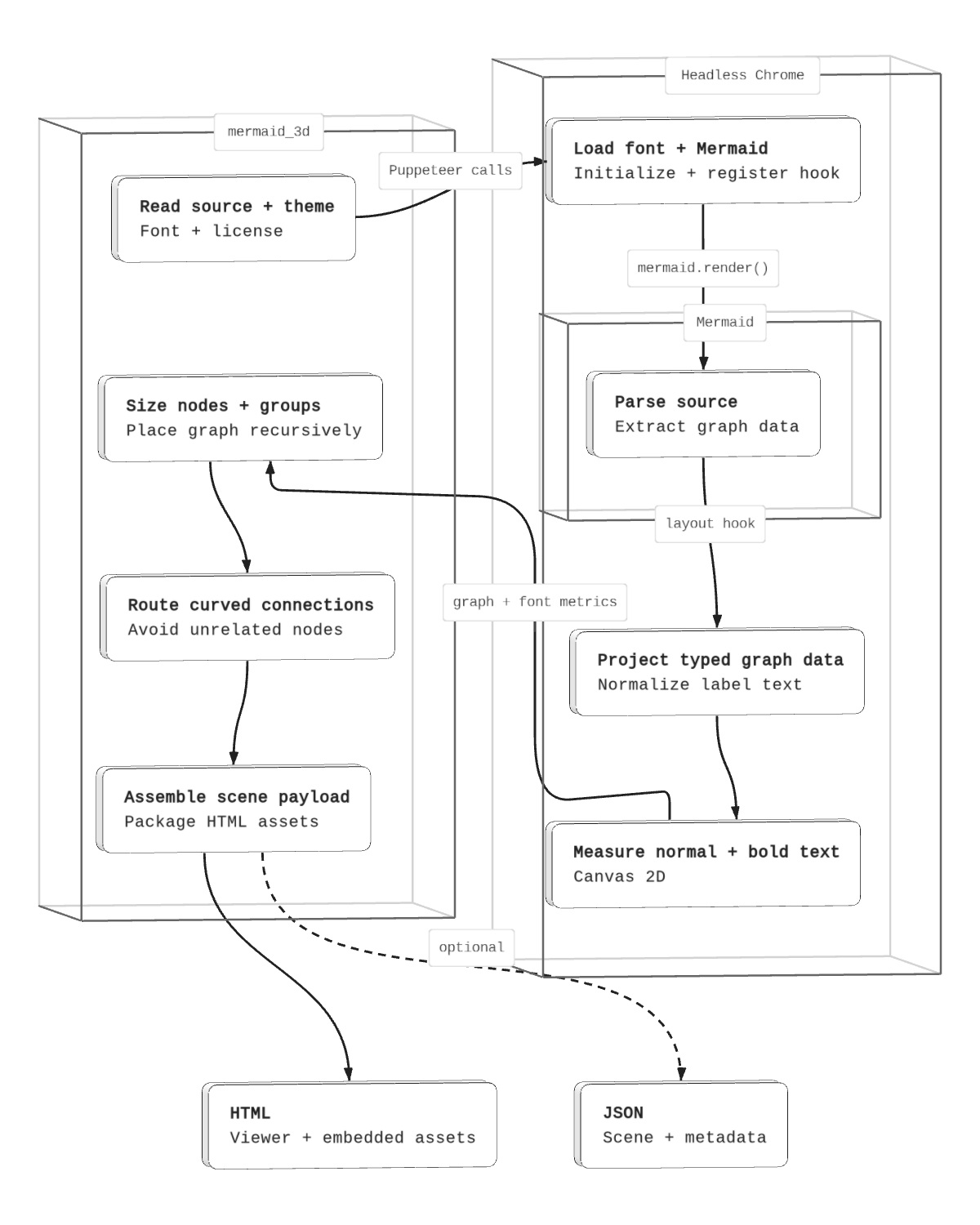
Explore the flowchart in 3D.
Native 2D SVG.
All views are generated from one Mermaid source.
The flowchart follows a successful CLI run.
The mermaid_3d CLI runs in Node and launches a separate headless Chrome process
through Puppeteer. Chrome loads the font and Mermaid; the nested Mermaid group
shows the mermaid.render() call. Our layout hook projects typed graph data and
normalizes label text before canvas measurement. The CLI receives the graph and
font metrics, closes Chrome, then sizes and places nodes/groups, routes connections, and packages
the outputs. The Bazel rule invokes this CLI with declared inputs. The CLI writes
self-contained HTML and optionally exports the scene and metadata as JSON.

mermaid_3d in defs.bzl takes a Mermaid src and one theme target providing
MermaidThemeInfo, with out for HTML and model for inspection JSON. The
bundle supplies configuration, JSON light/dark palettes, font, and license.
The CLI uses headless Chrome to parse and normalize graph data and measure text.
Chrome supplies the DOM for Mermaid’s render hook and canvas font measurements.
It computes layout and routes, then embeds the model, modules, appearances, font,
and license in HTML. The offline browser viewer creates the Three.js meshes and
handles interaction.
The default output is HTML; the named JSON output is available for diagnostics.
The optional view attribute (CLI --view) selects front-left or front-right;
the default is front-right. Reset view restores the selected initial perspective.
Static snapshots
mermaid_3d_snapshot renders an existing HTML target as a PNG or WebP image.
It uses the viewer’s scene and framing, includes geometry and labels, and
encodes only the canvas. Documentation can embed the image and link to the
interactive HTML. No controls, server, or remote assets are required.
load("//projects/mermaid_3d:defs.bzl", "mermaid_3d_snapshot")

mermaid_3d_snapshot(
    name = "diagram_snapshot",
    src = ":diagram_3d",
    out = "diagram.3d.png",
    color_scheme = "light",
    camera = "isometric",
    width = 1600,
    height = 900,
)
The isometric option preserves the diagram’s configured 3D perspective.
Choose camera = "front" for a front projection. PNG is lossless; WebP uses
the browser’s highest quality setting. Defaults are 1280 by 960 pixels. Each
dimension must be 128–8192 pixels, with at most 16,777,216 pixels in total.
Choose an aspect ratio suited to the diagram; fitting the complete scene can
make text small in a narrow image. Build all five light/dark sample pairs with:
bazel build //projects/mermaid_3d/samples:snapshots
The site recognizes matching .dark.png and .dark.webp siblings using the
same theme menu as SVG diagrams. The architecture image above is a snapshot.
Scene construction
Mermaid owns parsing. A public registerLayoutLoaders extension receives nodes,
groups, and edges through mermaid.render for flowcharts, state, class,
entity-relationship, and mindmap diagrams. The temporary SVG lifecycle completes
without painting graph geometry; the spatial adapter builds a Three.js scene.
The browser projects explicit fields into typed graph data before measurement.
Sequence diagrams are unsupported because their rendering path bypasses this
extension; the command rejects them before producing a viewer.
The parsing browser normalizes display text before measurement, including Mermaid entity codes and generic class headings. Invisible graph links constrain placement without becoming visible or selectable connections. Groups use their declared direction or inherit the enclosing direction.
One measured text layout supplies card dimensions and label drawing, including bold headings and compartments. Decision nodes use diamond prisms with clear front faces sized to contain multiline labels; rear group strokes recede using the existing palette as the camera moves. Group titles retain line breaks and contribute to their frame dimensions; camera framing includes the labels’ visible extents.
Graph layout condenses cycles before ranking, places group members recursively, and reserves depth corridors for spatial edge routes. Connections leave side ports and use smooth curves when clear, adding rounded detours around obstructing nodes. Curvature adapts to available clearance; arrowheads follow the path tangent, and dash spacing remains continuous through bends. Decision-node ports follow the diamond face, including multiple connections on a side. Self-loops use separate ports on the same side and remain outside their node face. Connections use a tube renderer, with dash sections merged into one mesh per path. Each embedded JavaScript module has one import-map entry, avoiding duplicate copies of the Three.js core. Their default projection also clears unrelated node faces. Nodes are solid meshes; groups are volume outlines; paths and markers have thickness. Relationship cardinalities remain explicit labels anchored near their endpoints. Edge captions and group titles use background plates with themed borders. Class and entity cards distinguish headings and compartments. Annotation labels avoid projected node faces and other labels using bounded displacement with leader lines, recomputed when the camera changes.
This is an initial renderer for the maintained examples, not full Mermaid syntax or shape parity. It preserves the shared font and palette, not arbitrary SVG CSS or per-node styles. Arbitrary camera angles or unusually dense diagrams can exceed the label-placement search area; selecting an element and changing the camera remains useful. Optimal routing is not guaranteed. Mermaid graph-data changes require adapter verification on upgrades.
TypeScript
All renderer, snapshot, and project E2E sources use ordinary .ts files.
Bazel checks them with strict and noEmitOnError, then runs or embeds the
emitted .js ES modules. One project-owned package.json supplies module
metadata. Model declarations connect the separate Node and browser compiler
contexts; Three.js declarations are compiler inputs and are not embedded
in the generated HTML. Generated JavaScript stays in Bazel outputs.
Source layout
The command builds the model and packages a standalone viewer. Implementation
modules stay under internal/; the browser controller owns camera and UI state,
with scene construction and label placement handled separately.
| Path | Responsibility |
|---|---|
cmd/render/main.ts | Parse inputs, measure themed text, and embed the viewer’s modules and assets |
internal/model.ts, routing.ts | Adapt Mermaid data, place elements, and route connections |
internal/text.ts | Shared text layout for build-time measurement and browser drawing |
internal/viewer/main.ts | Camera, controls, selection, and rendering updates |
internal/viewer/scene.ts, labels.ts | Three.js objects, label drawing, placement, and inspection |
internal/viewer/document.ts, viewer.css | Offline HTML document and viewer styles |
test/browser/ | Browser verification and behavior fixtures |
cmd/snapshot owns offline image export; internal/snapshot.bzl exposes its
build rule, and test/snapshot checks the encoded images end to end.
Verification
bazel test //projects/mermaid_3d/test/browser:browser_test //projects/mermaid_3d/test/snapshot:snapshot_test
The browser test opens every built view with remote requests blocked. It checks
source labels and counts, node volumes, group containment, routes against unrelated
nodes, theme/font loading, selection, camera orbit/reset, mobile controls,
readable label sizes, projected label separation, scene framing, and native touch
scrolling. It emits full-scene, light/dark, front, phone, and overview screenshots
and verification.json with the checked HTML hashes in the test’s test.outputs
directory. Five graph fixtures cover shared identifiers, self-loop projection,
long multiline group titles, entity decoding, generic class text, diamond
containment, invisible links, local subgraph direction, and diamond connection ports.
The architecture view also verifies the CLI to the left and in front of Chrome.
The eleven maintained views enforce budgets of 4 MiB per HTML file and 150 draw
calls per scene. A separate fifty-node flowchart checks visible canvas pixels
after opening, orbiting, resetting, changing view and appearance, and resizing.
At device pixel ratio 2 it verifies actual WebGL buffer dimensions, GPU limits,
visible raster content for every node, and native density in the small overview.
Images and drawing-buffer measurements are retained with the artifacts.