This X Article was generated from Markdown
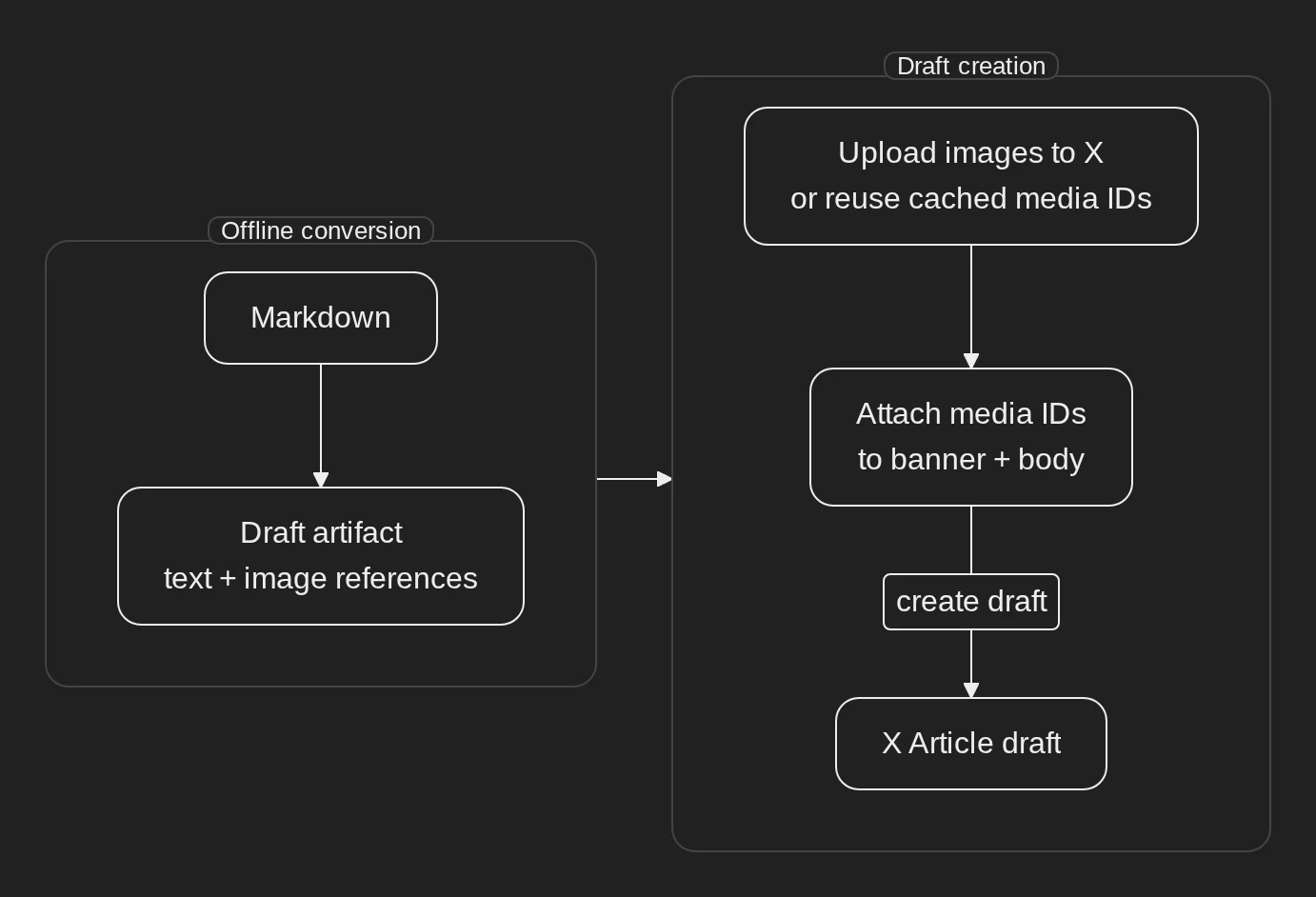
I’ve had the displeasure of using X’s Article editor and it has left me unsatisfied - it’s utter dogshit. Naturally, I’ve decided to avoid it altogether. There probably exists a ready-made solution, but I’ve decided to just write it myself. After all, how hard can it be?
Not that hard, to be honest. X exposes an API to upload articles in DraftJS format, so that leaves two tasks:
- Build DraftJS
- Upload it
Build DraftJS
Here is an example of a DraftJS payload that X expects:
{
  "title": "My article",
  "content_state": {
    "blocks": [
      {
        "key": "title",
        "text": "My article",
        "type": "header-one",
        "inline_style_ranges": [],
        "entity_ranges": [],
        "data": {}
      }
    ],
    "entities": []
  }
}
Seems simple enough. Since I use Hugo to build my blog posts, I wanted to just render the payload with it - that did not work.
Hugo does not expose Markdown AST to templates, only raw text, so if I wanted to write a template for DraftJS, then I would have to parse raw Markdown with Go templating tools and then construct DraftJS from it which is theoretically possible, but insane and brittle.
Another option that seemed promising was Render hooks which override conversion from Markdown to HTML. It was not suitable because while they allow you to override some elements, it’s still not full AST parsing.
Because Hugo was unsuitable, I’ve moved on to the boring option of just parsing Markdown in Go. I chose Goldmark since it’s the parser Hugo uses, then wrote a tool that walks through the Markdown AST and emits DraftJS.
X does not allow you to inline media in the payload, so I had to add a couple of custom fields for the uploader to handle media correctly.
Here is an example of an artifact that is built from Markdown:
{
  "payload": {
    "title": "Example",
    "content_state": {
      "blocks": [
        {
          "key": "block-0",
          "type": "unstyled",
          "text": "Hello world.",
          "inline_style_ranges": [
            { "offset": 6, "length": 5, "style": "bold" }
          ],
          "entity_ranges": [],
          "data": {}
        },
        {
          "key": "block-1",
          "type": "atomic",
          "text": " ",
          "inline_style_ranges": [],
          "entity_ranges": [{ "offset": 0, "length": 1, "key": 0 }],
          "data": {}
        }
      ],
      "entities": [
        {
          "key": "0",
          "value": {
            "type": "image",
            "mutability": "immutable",
            "data": { "caption": "Diagram" }
          }
        }
      ]
    }
  },
  "image_locators": [
    {
      "entity_key": 0,
      "path": "diagram.webp",
      "post_package": "out/article-payload/example",
      "digest": "422ba47ab0602f2875e0cbab8c5b2479a9140f1790122f6899885e870230de89",
      "media_type": "image/webp",
      "caption": "Diagram"
    }
  ],
  "banner_locator": {
    "path": "diagram.webp",
    "post_package": "out/article-payload/example",
    "digest": "422ba47ab0602f2875e0cbab8c5b2479a9140f1790122f6899885e870230de89",
    "media_type": "image/webp"
  }
}
The uploader uploads the media from locator fields and then patches the payload with media IDs.
Upload it
The upload seemed like the most straightforward part to me before I started - just generate a token, put it in Vault, and hit the API, easy. None of it was easy.
Figuring out which token I need to generate to upload articles and how to do it through the dashboard took some effort. Either the dashboard is bad, or it was simply a skill issue, maybe both. I’m not sure.
Putting a token in Vault was harder than I expected because there are two options for Article upload: OAuth 1.0a and OAuth 2.0. OAuth 2.0 seems like an obvious choice - it’s version 2, after all, but to utilize it I would need to use a short-lived token and then refresh it using a long-lived refresh token that is also rotated after a refresh. This seems like a very complex setup and I would need to update the secret pretty often, so I’ve settled on OAuth 1.0a. It worked alright, although it requires 4 different secret values and some request signing magic.
At this point I have my tokens, I have my DraftJS - I can just upload the media, and then the article, right? Wrong. X has a rolling limit of 10 article uploads per day which I immediately hit. After an investigation, I’ve figured out that X’s API kept returning me 503 Service Unavailable errors in response to my requests and I obviously kept retrying them, but those failed requests still count toward the limit. Very baffling behavior - there were no useful error messages, nothing, I just kept getting 503 errors out of nowhere. After some more research, the reason was the payload - I had a heading with depth 3, but X does not support it. After reducing heading depth, the problem was solved and I got a full Markdown to X upload.
In conclusion
I don’t have to touch the editor anymore, which is a win in my book. The blog post ends here. Everything else is just some Markdown to show conversion.
Text and inline styles
A paragraph is a plain text block. The converter uses the two heading styles accepted by X’s draft endpoint, mapping third-level and deeper Markdown headings onto header-two. Inline styling is carried as ranges over the block text: bold, italic, and strikethrough all survive the conversion, and a span may combine them, as in bold with nested italic inside.
Heading levels
First- and second-level headings become header-one; third-level and deeper headings become header-two.
A clamped fourth-level heading
Lists
Unordered lists and ordered lists map onto their own block types:
- Draft creation resolves each referenced image.
- It uploads the bytes through the media endpoint.
- It attaches the returned
media_idto the entity its locator names.
- Convert the post offline.
- Create the draft with the injected credential.
- Review the draft before it becomes public.
A nested item is emitted as its own list item, because the endpoint’s schema has no block depth:
- Parent item.
- Nested item.
- Another parent item.
Quotes
X exposes a blockquote type, so quoted prose keeps its quote. A heading inside a quote stays quoted text and reports the lost heading level, because there is no quoted-heading form.
Code
A fenced code block is preserved as a markdown entity, so the source travels intact:
func (c Credentials) Sign(method, rawURL string, params url.Values, now time.Time) (string, error) {
    // HMAC-SHA1 over the normalized parameter string, per RFC 5849.
}
An inline-code span keeps its text but loses its monospace styling, and the conversion reports that loss.
Tables
A GFM table has no native block, so it becomes a markdown entity that preserves the source:
| Element | Entity type | Mutability |
|---|---|---|
| Link | link | mutable |
| Image | image | immutable |
| Divider | divider | immutable |
| Code and tables | markdown | mutable |
Links and autolinks
A link carries its destination in a link entity: the repository skill for Mermaid diagrams. An autolink such as https://example.com becomes a link to the same destination.
Divider
Footnotes
A footnote reference1 becomes a trailing section, so its text is not lost.
Note on images and captions. An image becomes an
atomicblock backed by animageentity carrying its alt text as a caption, and the media is resolved at draft time.
Emphasis edge cases
An underscore inside a word like snake_case stays literal, a backslash escape such as *not italic* stays literal, and the HTML character reference & in AT&T is resolved to an ampersand.
DraftJS measures inline and entity ranges in UTF-16 code units of the block’s final text, which is why the converter counts them that way. ↩︎
Diagrams in the AC (After Clanker) era
I have some diagrams in the repo, as one naturally does. My diagrams do not look particularly pretty, but they display information, which is the whole point.
In the BC (Before Clanker) era, I made them manually using Drawio’s desktop app. I used this approach because it requires no setup and no effort - you just fire up the app and then click things in the UI. Everything is local, and the diagrams themselves are XML, so you can version control them. It’s the AC (After Clanker) era now, so I need to be able to have clankers modify my diagrams, and I have more options in general, so I’ve decided to improve them.
New tool
The first goal was, of course, to make them prettier - I wanted to see something pleasing to the eyes, not ugly boxes and straight arrows. Ideally, something like Excalidraw - hand-drawn look, rounded corners, curved edges, all the rage.
The second goal was to simplify their source representation. Drawio diagrams are XML, so they can be version controlled and clanker-managed, but they are too complex and not readable. I wanted a simple DSL that allowed me to just describe the diagram itself - nodes, labels, edges, etc.
The third goal was theme support. While every diagram was supposed to be as simple as possible, they all should look pretty and use one style without being a part of the same project.
The fourth goal was hermeticity. All these diagrams should be rendered locally and hermetically through Bazel without a CDN or any other funny business.
In the end, I’ve settled on Mermaid because it’s the first big Open Source project I’ve found that fit my criteria and I did not care enough to research other options. After all, we are in the AC era - I can just rewrite things.
Rendering
I wrote some Bazel rules that hermetically render Mermaid diagrams using Mermaid (duh), Chrome for Testing for actual rendering, and Architects Daughter as a font. Those rules had to generate a custom Fontconfig configuration file because Chrome stubbornly tried to use host fonts.
Style
The default Mermaid style is very bad, so I’ve made a custom theme, which was pretty easy - it’s just a config. Theming is not powerful enough, though - Mermaid 11’s hand-drawn renderer hardcodes square corners for flowchart containers, for example, and I had to add post-processing for SVGs to embed my custom font inside of them.
Default theme:

Custom theme:

Layout
While styling was pretty straightforward, there were a lot of problems with the layout.
In no particular order:
- No way to properly control width: The only real lever is the direction.
- The direction is not reliable: You can control the overall direction, but direction inside of groups is often ignored.
- Container titles: An edge can draw over a container title, and there is no way to avoid it, so I had to add postprocessing for this.
Diagram types
I’ve looked into diagram types other than flowchart, and there was nothing even remotely suitable except for an architecture diagram. A shame that it looks even worse than the default theme:
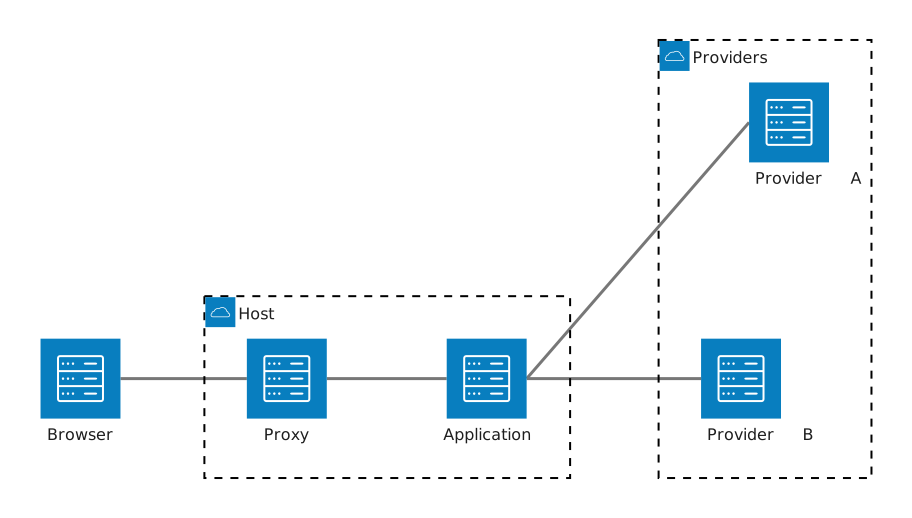
Final look
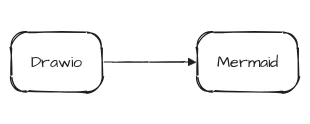
Here is the old Drawio diagram:

It looks bad and its source is unreadable and the diagram is unmaintainable without a GUI.
Here is the new Mermaid diagram:

It’s readable and looks pretty. I like it.
Here is its source. It’s also pretty and readable:
flowchart LR
    subgraph internet["Internet"]
        direction TB
        remote("Actor")
        ingress("Ingress")
    end

    subgraph dc1["Local infra<br/>dc1.alwaldend.com"]
        direction TB
        intranet("Actor")
        vault("Vault<br/>vault.alwaldend.com")

        subgraph host_bot["Bare metal host<br/>host-bot.simeonwarren.users.alwaldend.com"]
            direction TB
            traefik("Traefik")
            t3code("T3 Code")
            codex("Codex")
        end
    end

    subgraph external["Internet"]
        direction TB
        github("GitHub<br/>github.com")
        openai("OpenAI<br/>openai.com")
        openrouter("OpenRouter<br/>openrouter.ai")
    end

    remote -->|"HTTPS + mTLS"| ingress
    intranet -->|"HTTPS"| traefik
    ingress -->|"HTTPS over Wireguard"| traefik
    traefik --> t3code
    t3code --> codex
    traefik <-->|"ACME (HTTP)"| vault
    t3code -->|"Source"| github
    codex ---|"Inference"| inference@{ shape: junction }
    inference --> openai
    inference --> openrouter

    classDef actor font-style:normal;
    class remote,intranet actor
In the end:
- Diagrams are pretty, check. Although they still lack some pizzazz.
- Source is simple, check.
- Unified theme, check.
- Hermeticity, check.
DNS management in a monorepo
Buying a domain is one of the best purchases you can make because they are very cheap and owning one offers you more independence - you can have your email not tied to a specific provider, you can have a site, etc.
After I bought a domain, I needed a way to manage DNS of that domain. Since using the registrar’s UI to do that is not the best idea, I searched for an IaC tool that can do that for me - I settled on DNSControl.
Single-file config
Initially, I just needed to set up email and GitHub Pages, so I used the most basic setup imaginable.
infra/dns/
├── dnsconfig.js # DNS config
├── creds.json.tpl # Credential config
└── zones/
    └── alwaldend.com.zone # BIND file
I just wrote records in DNSControl’s subset of JavaScript and templated secrets from the environment using envsubst. It worked alright, and DNSControl rendered a BIND file so I could see the computed DNS records as text.
Single-file config with secret injection
At some point, I migrated my secrets to HashiCorp Vault because storing secrets in environment variables is a big no-no. That didn’t change the layout. The credential config just became a Go template that used secrets from Vault.
Per-project config
Once I started setting up infrastructure, I hit an annoying limitation - extracting records from .js is extremely inconvenient, which means that you have to duplicate IPs for VMs instead of just extracting them from the config. And managing all DNS records in a single .js file is not very convenient either. To solve it, I split the main config into several static per-project configs and then just parsed them in the main .js file.
The layout became like this:
infra/dns/ # The main DNS project
infra/project/ # Another infra project
├── dnsconfig.json # Static DNS config
And the config looked like this:
{
  "domains": {
    "default": {
      "records": {
        "host1_a": {
          "A": {
            "name": "host1.consul1.dc1",
            "address": "192.168.10.20"
          }
        }
      }
    }
  }
}
This was a bad config design as will become clear later.
Split-horizon DNS
Later, I decided to set up Split-horizon DNS so I can have different records for internal and external DNS servers. Thankfully, DNSControl supports this, so there were no problems from this side, but configs had to be redone because they grouped records by domains which did not translate well to DNSControl’s DNS providers.
I simplified the config and added dsp fields to select which DNS provider the record belongs to.
{
  "records": {
    "host1": {
      "A": {
        "name": "host1.threexui",
        "address": "192.168.10.80"
      },
      "dsp": ["dc1"]
    }
  }
}
Terraform
That setup worked fine for a while, but then I stumbled upon an obvious flaw during a clanker session - there is no way to work in parallel (without mucking around with IGNORE and NO_PURGE). DNSControl controls the whole zone, so if you have different sessions applying different configs, then those changes override each other.
That seems like an easy problem to fix - just split the domain into different zones, and it was easy for my local DNS (a MikroTik router) because DNSControl’s provider has zone hints, but there is no way to split the domain on the external DNS (Cloudflare) without buying an Enterprise plan or without delegating to yet another DNS provider.
I thought about my options and decided to just switch to Terraform because I already have a standard way of handling Terraform in the repo. This approach fixed the problem, because now projects own only their own DNS records, so you can work on them in parallel.
To implement DNS control in Terraform, I wrote a Terraform module which parses the config and updates DNS, then used it in each project. I also added a linter that checks that projects do not overlap DNS records. The final layout looks like this:
projects/
├── project name/
│   ├── dnsconfig.json # DNS config, unchanged
│   └── tf/ # A Terraform directory
└── tf_modules/dns_records/ # Reusable Terraform module

infra/dns/
├── dnsconfig.json # Generic DNS like email
├── tf/ # A Terraform directory
└── cmd/lint/ # A linter that checks configs for collisions
Future
There are no restrictions on DNS management - each project uses the same API keys and can modify the whole domain. This is not ideal, of course, but it’s not that big of a deal because I trust all developers involved (Me and clankers) to not fuck it up. I might revisit this problem in the future, but for now this setup is good enough.
Slop without a clear goal
A while back, I said to Jipity1: “Jipity, how can I improve agent ergonomics in this monorepo?”, and Jipity gave me some useful suggestions, but one of them was not like the rest. It said that context in the repo was too splintered — agents had to read many things in different directories to understand how things are done. In my infinite wisdom, I said, “Jipity, write me a comprehensive plan implementing a unified agent system with the goal of improving ergonomics in this monorepo”. And it wrote me a plan, I did not really read it.
The plan consisted of several phases which gradually added more agent ergonomics improvements. Over the course of several days I made several PRs implementing the plan. In each PR, agents added things I did not understand according to the plan I did not read. After I prompted them to explain and still did not understand, I gave up and decided to just “trust the plan”, and merged everything. After implementing the plan, my repo was littered with garbage manifests, I had a lot of new code, and nothing really changed.
I decided that maybe I did not trust the plan enough, and did a couple more phases of “ergonomics improvements”, which also did nothing but increase line count and litter the repo with garbage. Overall, I got around crisp 30k lines of new code.
30k of code is not much in the grand scheme of things, but I don’t like that my pristine monorepo had 30k lines of pointless slop, so I’ve deleted the “agent system”.
The lesson here is that you need to have a clear idea of what you are trying to accomplish, I guess.
Data
Jipity made me a table, seems about right.
| Date | Timeline item | Code files | Non-code files | Code LOC | Non-code LOC | Total LOC |
|---|---|---|---|---|---|---|
| 2026-08-31 | Phase 0 — System contract | 4 | 39 | 21 (+21/−0) | 6,908 (+6,825/−83) | 6,929 |
| 2026-08-31 | Phase 1 — Shared semantics and controls | 32 | 58 | 2,661 (+2,456/−205) | 2,779 (+2,736/−43) | 5,440 |
| 2026-09-01 | Phases 2–3 — Context, recovery, planning, and evidence | 115 | 73 | 18,018 (+17,850/−168) | 3,121 (+2,980/−141) | 21,139 |
| 2026-09-02 | Phase 4 — Connect work, delivery, and release | 26 | 19 | 2,996 (+2,883/−113) | 566 (+521/−45) | 3,562 |
| 2026-09-02 | Phase 5 — Learning contracts | 21 | 16 | 1,524 (+1,523/−1) | 311 (+258/−53) | 1,835 |
| 2026-09-03 | Phase 5 follow-up — Exercise the learning workflow | 25 | 27 | 914 (+883/−31) | 1,043 (+1,007/−36) | 1,957 |
| 2026-09-03 | Phase 6 — Reduce workflow friction | 28 | 69 | 1,198 (+1,101/−97) | 1,206 (+793/−413) | 2,404 |
| 2026-09-05 | System simplification | 41 | 49 | 5,037 (+4,548/−489) | 4,714 (+2,293/−2,421) | 9,751 |
| Overall | 8 commits | 292 | 350 | 32,369 (+31,265/−1,104) | 20,648 (+17,413/−3,235) | 53,017 |
GPT 5.6 Sol. ↩︎